We need your help to keep this website free. You can buy us a coffee to support us.
How to Download YouTube Subtitles (Step by Step Guide)
If you’ve never downloaded subtitles before, don’t worry — it’s very simple. Just follow the steps below depending on whether you’re using a computer or a mobile phone.
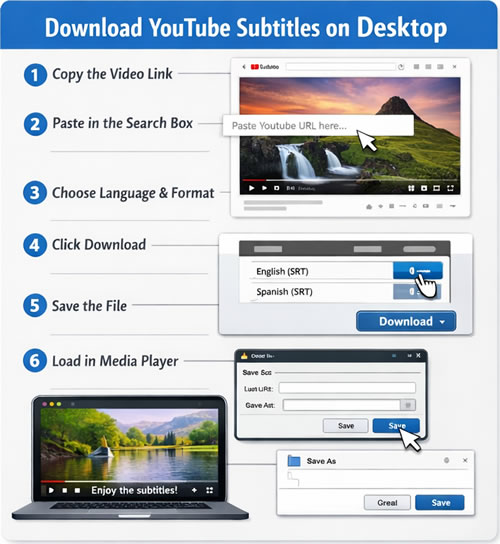
💻 How to Download YouTube Subtitles on Desktop (Computer)
Step 1: Open the YouTube Video
✔️ Go to YouTube in your browser and open the video you want subtitles for.
Step 2: Copy the Video Link
✔️ Click on the address bar at the top of your browser.
✔️ Highlight the full URL (it looks like: https://youtube.com/...)
✔️ Right-click and choose Copy.
Step 3: Open the Subtitle Downloader Website
✔️ In a new tab, go to our subtitle downloader website.
Step 4: Paste the Link
✔️ Click inside the search box on the website.
✔️ Right-click and choose Paste, then click the Download or Search button.
Step 5: Choose Language and Format
✔️ After a few seconds, you’ll see available subtitle options.
✔️ Choose a format (usually SRT works best).
Step 6: Download the File
✔️ Click the Download button and save the file to your computer.
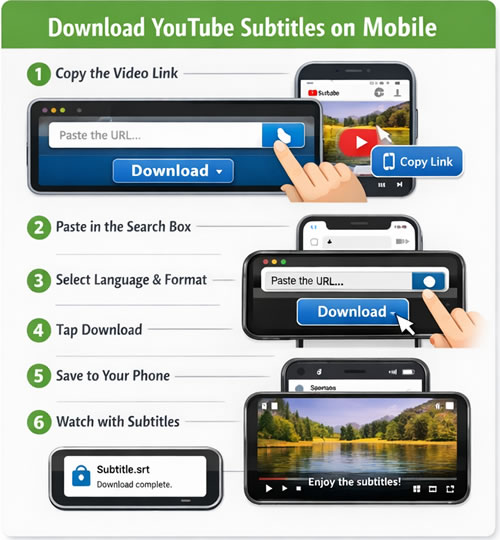
📱 How to Download YouTube Subtitles on Mobile (Android & iPhone)
Step 1: Open the YouTube App or Website
✔️ Find and open the video you want subtitles for.
Step 2: Copy the Video Link
✔️ Tap the Share button under the video.
✔️ Then tap Copy link.
Step 3: Open Your Browser
✔️ Open Chrome, Safari, or any browser on your phone.
✔️ Go to our subtitle downloader website.
Step 4: Paste the Link
✔️ Tap inside the search box.
✔️ Hold your finger down and tap Paste, then press Download or Search.
Step 5: Select Subtitle Language
✔️ Choose the subtitle language you need and select the format (SRT is recommended).
Step 6: Download the File
✔️ Tap Download. The subtitle file will be saved to your phone.
Online YouTube Subtitle Downloader
Looking for the best online YouTube subtitle downloader? Our platform offers a fast, reliable, and user-friendly solution to download subtitles directly from YouTube videos in just seconds. With support for multiple languages and popular formats like SRT and VTT, you can easily access accurate, perfectly synced subtitles for any video. No software installation is required — simply paste the video URL and download instantly. Trusted by thousands of users for its speed, simplicity, and unlimited downloads, our tool makes getting YouTube subtitles easier than ever.
Latest Subtitles Downloaded from Youtube